Before you begin: Refer to Downloading PlanSwift for instructions on how to download the PlanSwift software. Additionally, in order to complete this task, the file: SST Quickstart Types must be the file used for import. If you do not have this file, click Simpson Strong-Tie Support and request it.
About this task: By replacing the PlanSwift Types, you will make sure data works properly with Pipeline LBM. Follow the instructions listed below to import Pipeline LBM Types into the PlanSwift application.
Importing Pipeline LBM Types to PlanSwift:
- Within PlanSwift, select the Templates tab from the task header at the top of the screen.
- Click Types
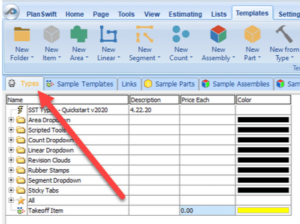
Note: If Types does not appear the way it is shown in the above picture, go to Settings – Select Interface – Select Show Types Tab in Templates Screen
Now, you will need to replace anything you see on the Types tab with information compatible with Pipeline LBM.
- Hold the Shift key and select all rows.
- With everything highlighted, right click and select Delete, or hit the Delete Key on the keyboard.
- Once the Types tab is empty, click the Import tab at the top of the screen.
- Select the SST Quickstart Types file.
- A confirmation screen will open, no need to change any information, and select Ok.
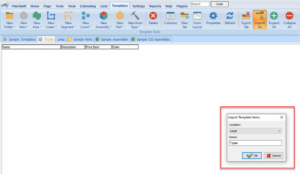
- It is required that you close out and re-start PlanSwift before continuing to the import of Templates.