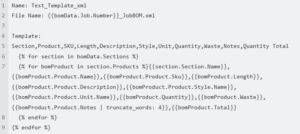
About this task: Liquid is a template language that is used to render dynamic content. This document will help with understanding how to use Liquid templates in Pipeline LBM application, specifically for generating Bill Of Materials (BOM data. The following documentation includes template examples in CSV, JSON, TXT, & XML formats, as well as an explanation of template properties.
Template Examples:
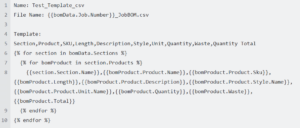
Liquid Template – CSV format for use in LBM application
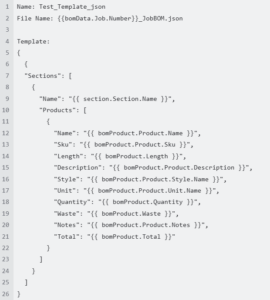
Liquid Template – JSON format for use in LBM application
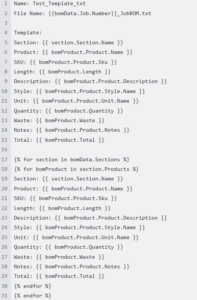
Liquid Template – TXT format for use in LBM application
Liquid Template – XML format for use in LBM application
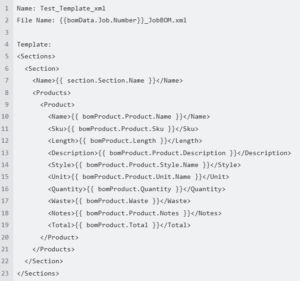
Explanation of Template Properties
- Name: The name of the template
- File Name: The name of the output file, dynamically generated using properties from the
Jobclass. For example,{{bomData.Job.Number}}_JobBOM.xml. Any Job Properties can be used:- ID: Unique identifier for the job
- Number: Job number
- Location ID: Identifier for the location
- Location: The location details
- Customer ID: Identifier for the customer
- Customer: The customer details
- Status: Status of the job
- DueDate: Job due date
- Address: Address associated with the job
- SalesRep: Sales representative for the job
- EstimatedValue: Estimated value of the job
- Notes: Additional notes about the job
- CreatedOn: Date when job was created
- Template: The example here is structure of the CSV file, including headers and data rows (
Section,Product,SKU,Length,Description,Style,Unit,Quantity,Waste,Quantity Total).
Looping Through Data
The template uses nested loops to iterate through sections and products:
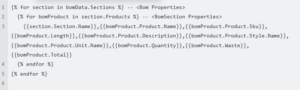
Enabling Nested Lengths:
Filter Products based on available lengths in order to enable nested lengths.
Properties used for Liquid Templates
BOM Properties:
- ID: Unique identifier for the BOM
- Job: The job associated with the BOM
- Sections: List of sections in the BOM
Sections Properties:
- ID: Unique identifier for the section
- Section: The section details
- Products: List of products in the section
Section Properties:
- ID: Unique identifier for the section
- Name: Name of the section
- Code: Code associated with the section
- Description: Description of the section
- SortOrder: Sort order of the section
Products Properties:
- ID: Unique identifier for the product
- UseID: Identifier for the use case
- Product: The product details
- Use: The use case details
- Quantity: Quantity of the product.
- Waste: Waste associated with the product
- Rounding: Rounding value for the product
- Total: Total quantity including waste.
- Length: Length of the product
- Lengths: List of lengths for the product
Liquid template example showing “Use”:
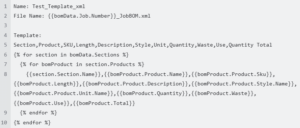
Liquid template example showing “Notes”
The Notes field in Database is varchar, values in VARCHAR columns are variable-length strings. The length can be specified as a value from 0 to 65,535. Words can be truncated, which shortens a string down to the number of words passed as an argument. If the specified number of words is less than the number of words in the string, an ellipsis (…) is appended to the string.