Calculations convert takeoff quantities into the material quantities used throughout Pipeline LBM. A Calculation uses the input quantity (QTY) and applies a formula to produce an output amount. By defining Calculations in Pipeline LBM, you standardize how materials such as studs, sheathing, or panels are computed, and Pipeline performs the math automatically in the background.
Click here for more information on how to set up a valid calculation.
Add a Calculation
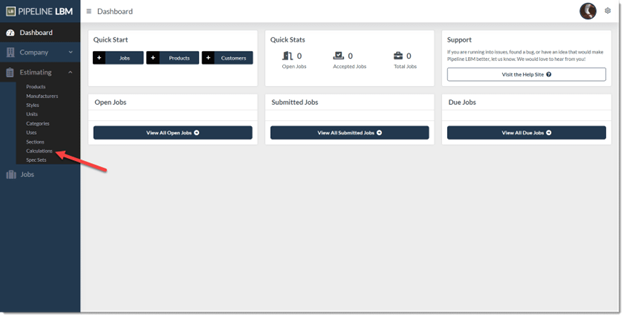
- From the Pipeline LBM Dashboard, use the blue navigation bar to open Calculations under the Estimating section.
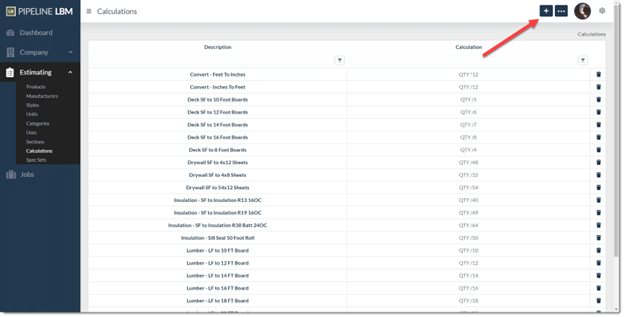
- Click the + (plus) icon in the upper-right corner to open the New Calculation dialog.
- In the New Calculation dialog:
- Enter a clear, descriptive name.
- Enter the Calculation formula, following all required rules.
- Review your formula to ensure QTY is included and no spaces are present.
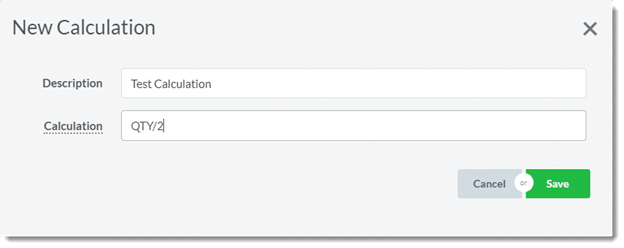
- Click Save.
Best Practices
- Use consistent naming conventions to make Calculations easier to locate and apply.
- Test new Calculations within a sample Key Measure to confirm expected results.
- Avoid overly complex nested formulas. Consider splitting logic across multiple Key Measures if needed.