Before you begin: A license is required to download PlanSwift. PlanSwift licenses are activated by the Pipeline LBM implementation team. Upon activation, an email will be sent from ConstructConnect with instructions on how to create a PlanSwift My Account password. The user name to be used in connection with the PlanSwift password will be the email address this information was sent to.
Downloading PlanSwift:
1. Navigate to www.planswift.com
2. Click on My Account in the blue colored task bar at the top of the screen.
3. Enter login Username / Password
4. Click Licenses then Locate and select the PlanSwift Licenses tab.
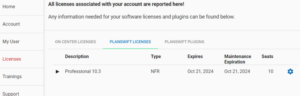
5. Click the gear icon located to the right.
6. Click Download Software.
Result: PlanSwift will start to download automatically.