Use the Joist/Rafter tool to measure square footage and select a lumber type. It will fill the selected area with that lumber at the specified spacing.
Before you begin
- The job must be open in the Takeoff workspace.
- Appropriate Area Key Measures must be available.
Use the Joist/Rafter Tool
- Select the Joist/Rafter Tool from the Takeoff panel. This will open the Measurement Properties dialog box.
- In the Measurement Properties dialog, review or update settings such as measurement type, O.C. Spacing, Pitch, Rounding, Joist/Rafter Direction, BOM section, and color.
- O.C. Spacing is the on center (O.C.) spacing distance between the Joists or Rafters. If your desired spacing isn’t available in the dropdown, type it in, then left-click to select it. This must be a whole number.
- Pitch lets you set the angle used to adjust the measurement. It typically reflects the roof pitch, if there is one. Note: The Pitch field is assumed to be above 12. If your desired pitch isn’t available in the dropdown, type it in, then left-click to select it.
- Rounding dictates how the final measurement will be rounded.
- The Joist/Rafter Direction dictates the direction that the Joist or Rafter will run once applied.
- Section determines where the subcomponent will appear on the Bill of Materials. Note: The Section of the products can only be changed here if “Assume Section” is selected in the subcomponent page of that Key Measure.
- Optionally, you can assign a specific Use, and it will add additional details on the job Bill of Materials.
- Assign a Color that you want to use for this takeoff. The color is randomized, and can be changed or left at the default.
- Select Apply.
Add the Area Measurement
- Left click to add points and create the area measurement.
- Select Stop Recording or press R to complete the area.
Initiate the Split Joist/Rafter Tool
If the joists/rafters need to be split, select the area measurement, and then select the Split Joist/Rafters button.
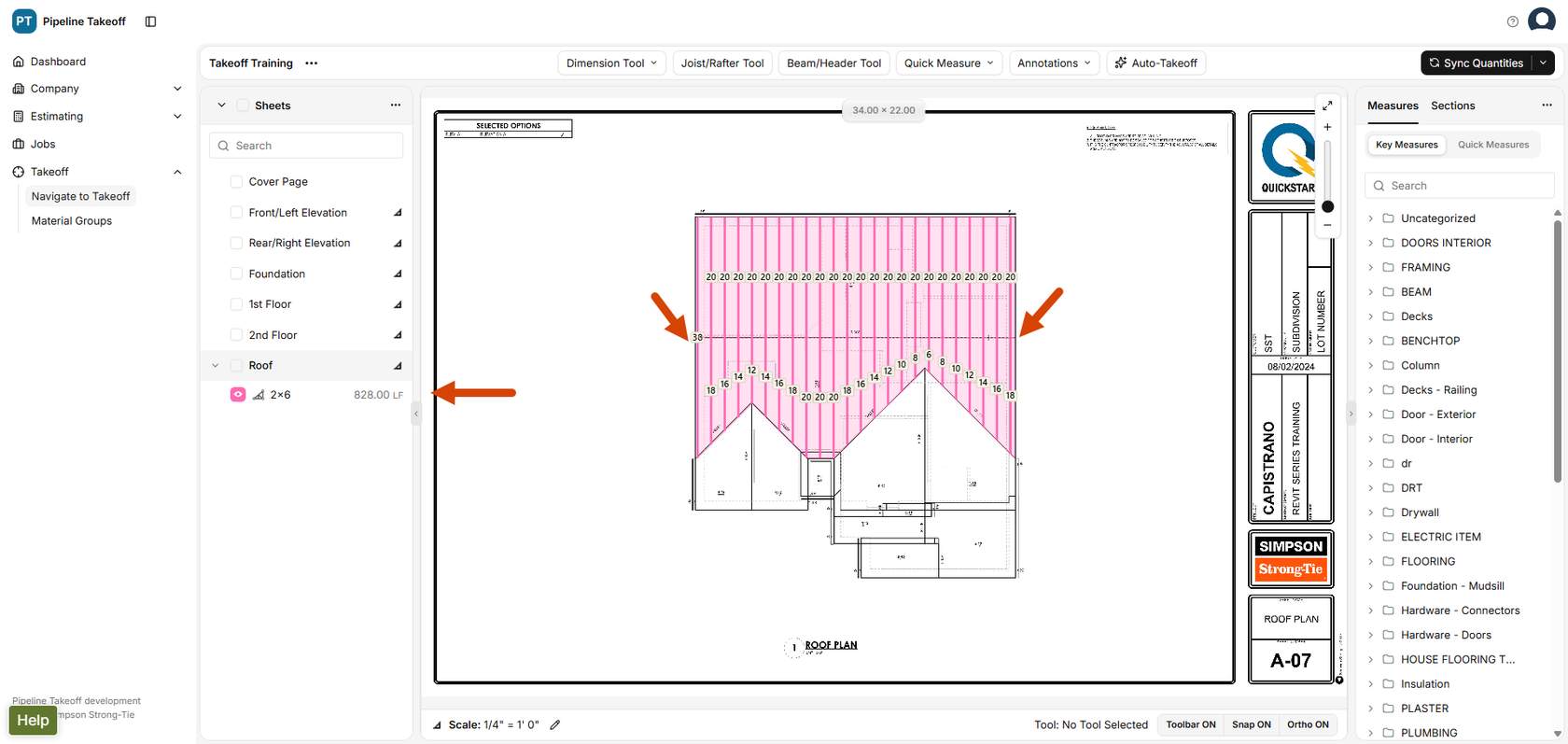
- In the Takeoff workspace, left click once on either side of the measurement area to split the joists/rafters between your clicks.
- The lengths will be adjusted.
Click here to learn about editing and modifying takeoffs.